A sales team still working with Excel files, scattered notes, and a shared inbox wastes time on every prospect: forgotten follow-ups, information that can't be found, approximate sales forecasts.
The right software solves this problem by centralizing all information about your customers and prospects, automating repetitive tasks, and giving salespeople a clear view of their pipeline.
But what is the best CRM for a sales team? This comparison reviews the essential features, the most cited solutions on the market, and a more recent option designed for teams that actively prospect. Spoiler: it's Centra :)
How does a CRM work for a sales team?
A CRM (Customer Relationship Management) centralizes in a single database all information about your prospects and customers: contact details, exchange history, sales opportunities, quotes, exchanged documents.
Concretely, every interaction a salesperson has with a prospect – a call, an email, a meeting – feeds a single record, consultable by the entire team. The CRM thus transforms scattered information into a structured sales process, with a pipeline that shows where each opportunity stands, from first contact to signature.
For a sales team, a CRM allows, for example, centralizing customer data and preventing a prospect from being contacted twice by two different salespeople. It can also help you automate repetitive tasks: follow-ups, follow-up emails, assigning leads to the right salespeople. The basis, in any case, is to track the sales pipeline and make forecasts more reliable, while measuring individual and collective performance. The must-have is keeping the memory of all exchanges with leads, so that when a salesperson changes position or goes on vacation, the data is still there.
What features should a CRM for a sales team offer?
Not all sales teams have the same needs, but certain features are essential for good sales CRM software.
Visual sales pipeline: customizable stages, drag-and-drop opportunities from one stage to another, real-time revenue forecasts.
Contact and account management: single customer record, complete interaction history, notes shared between salespeople.
Automation of repetitive tasks: automatic follow-ups, follow-up reminders, lead assignment according to defined rules.
Prospecting and enrichment: prospect research, enrichment of emails and phone numbers, for teams that don't settle for inbound requests.
Integrations: email, calendar, telephony, LinkedIn, so salespeople work in their usual tools without re-entry.
Sales reporting: conversion rate, sales cycle length, performance per salesperson, so managers can steer activity with reliable figures.
Mobility: mobile app for field salespeople who need to access the pipeline while on the move.
Artificial intelligence: email writing assistance, lead prioritization, automatic call summaries. A real time-saver, but one that doesn't replace a well-structured pipeline.
A good reflex is to ask, for each feature, whether it really saves salespeople time or whether it weighs down interactions. A CRM that users abandon after three weeks is useless, however complete it may be on paper.
How to choose the CRM best suited to your sales team?
Identify your sales team's profile
A team that responds to inbound requests (SMEs receiving form submissions) doesn't have the same needs as a team that goes out to find its prospects (cold calling or cold emailing). In the first case, the CRM must articulate well with marketing and web form management. In the second, prospect research, data enrichment, and multi-channel prospecting (email, LinkedIn, phone) become priorities.
Check the number of users and the pricing model
Most software charges per user per month, which can quickly weigh on the budget of a growing team. Some more recent platforms charge rather per workspace or per team, with unlimited users from a given tier: a point to check before comparing two displayed prices side by side.
Test the tool with the salespeople concerned
A CRM must be adopted by the salespeople themselves, not just validated by management. Request a free trial, have the pipeline and opportunity entry tested by two or three salespeople, including the most resistant to change.
Look at integrations with your existing tools
A CRM must connect to the team's email, calendar, and telephony, or even LinkedIn for teams that prospect on that channel. Check for native connectors rather than a generic promise of an open API.
Anticipate GDPR compliance
A CRM stores personal data about your prospects and customers: data hosting, encryption, and access rights management are criteria to check before signing, especially for a team handling large volumes of European contacts.
Comparison of the best CRM software for sales teams
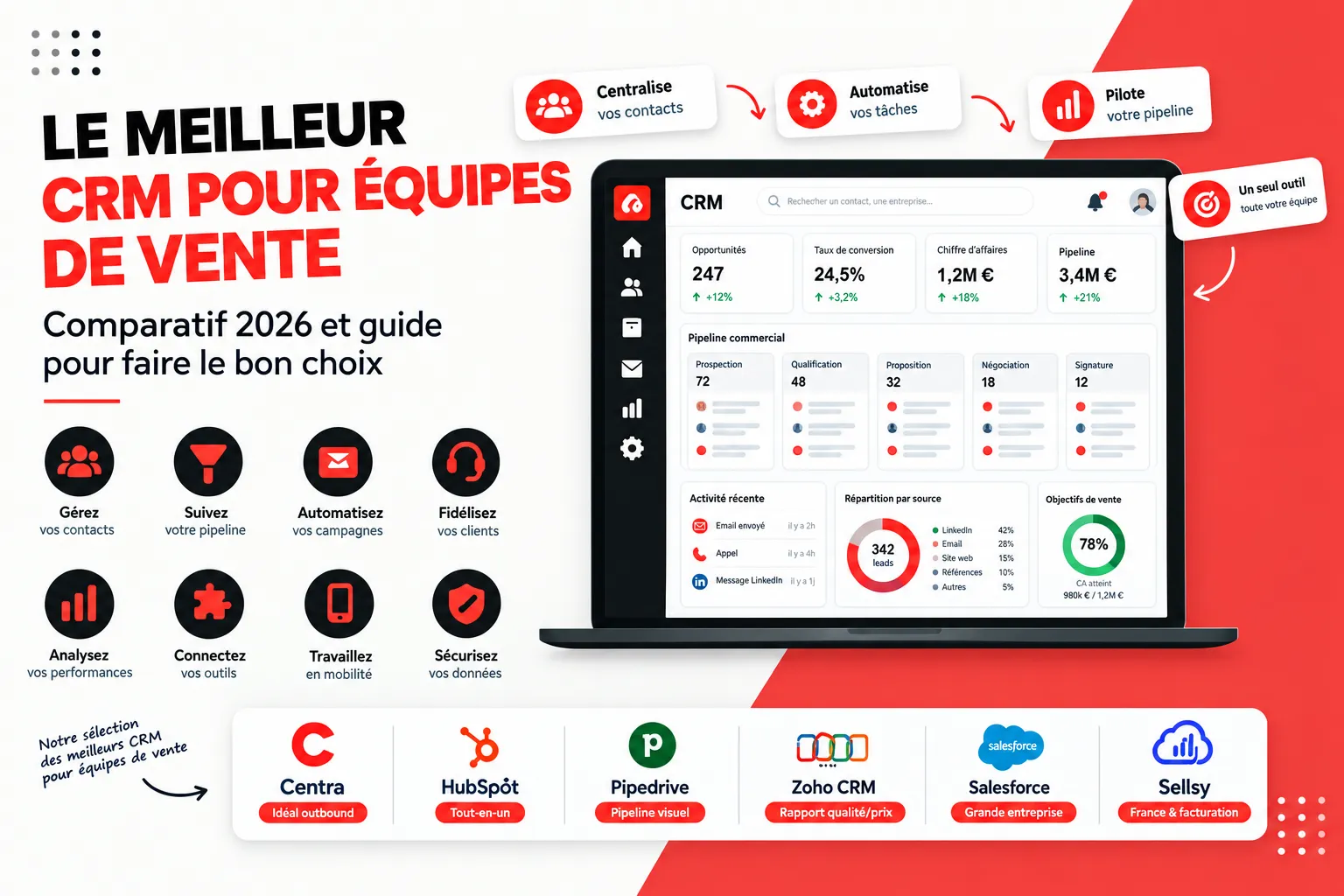
Here's a comparison of the tools most cited by sales teams and consultants, with their strengths and limitations. Some are complete CRMs that also cover marketing and invoicing; others remain pure sales management tools, deliberately lighter.
HubSpot: the reference for teams just starting out
HubSpot offers a very complete free CRM to get started, with modular paid features to automate sales tracking. Its interface is simple and onboarding quick, making it a frequent choice for small sales teams. Prices, however, increase significantly as soon as the team grows and activates advanced automations.
Pipedrive: the pipeline par excellence
Pipedrive is software centered around the sales pipeline, designed from the outset for salespeople rather than marketing teams. Its drag-and-drop interface and simplicity make it a reference for small businesses that want a tool focused on opportunity tracking, without superfluous features.
Zoho: the best features/price ratio
Zoho CRM appeals with its accessible pricing and its ecosystem of dozens of complementary applications. It suits SME sales teams well that want a feature-rich tool without a large-company budget, at the cost of an interface sometimes less intuitive than its competitors. Be careful of its features that may seem irrelevant.
Monday: workflow flexibility
Monday relies on a very visual interface and fully customizable workflows, close to project management. Sales teams that want to adapt each stage of their sales process without technical skills find great configuration freedom there.
Sellsy: the French CRM
Sellsy combines sales tracking, quotes, and invoicing in a single tool. It's a choice appreciated by sales teams at very small businesses and SMEs that want to manage the entire sales cycle, from prospecting to invoicing, without changing interface.
Salesforce: for large sales teams
Salesforce remains the reference for large companies, with an ecosystem of thousands of complementary applications. Its power has a counterpart: a high cost and configuration complexity that often requires a dedicated integrator.
Centra: a CRM designed for sales teams that prospect
Faced with these generalist CRM software programs, Centra starts from a different observation: a sales team doing active prospecting mainly needs to find prospects, engage them on several channels, and track its pipeline, without juggling between multiple tools. Without multiplying tools, Centra brings these three needs together. It's designed for outbound sales teams rather than for customer service or invoicing.
The sales team's work is organized around three pillars:
Find: prospect research via LinkedIn, French company registries, a Chrome extension, or importing your own files, with automatic enrichment of emails and phone numbers, and an AI agent to accelerate research.
Engage: multi-channel campaigns combining emails and native LinkedIn actions (invitations, messages, InMail) within multi-step sequences, so that each salesperson maintains a regular prospecting pace without spending their days on it.
Manage: contacts, companies, sales pipeline, tasks, and complete exchange history, centralized in one place, with a clear view of each opportunity's progress for both the salesperson and their manager.
On pricing, Centra offers a 14-day free trial with full access to the product, then three monthly plans: Solo at €69 for a salesperson or founder prospecting alone on LinkedIn, Team at €119 with unlimited users in a single workspace, designed for a complete sales team, and Agency at €219 for agencies managing prospecting for multiple clients. Unlike most CRMs billed per salesperson, from the Team plan onward the whole sales team can log in at the same price, which changes the real cost calculation as the team grows.
Centra isn't meant to replace a generalist CRM for a team whose activity relies mainly on inbound requests, structured customer service, or integrated invoicing: for these uses, HubSpot, Sellsy, or Zoho CRM will remain more suitable. But for any sales team whose growth depends on active prospecting, particularly on LinkedIn, Centra brings together in a single tool what many sales teams currently cobble together with a CRM, an emailing tool, and a separate enrichment software.
How does a CRM improve sales and opportunity tracking?
Without a CRM, opportunity tracking relies on salespeople's memory or on Excel files updated unevenly. A CRM changes this dynamic in several ways: each opportunity is attached to a precise stage of the sales pipeline, allowing the manager to see at a glance where bottlenecks are. Follow-ups are automated, preventing a hot prospect from cooling off due to lack of follow-up, and revenue forecasts are based on real data rather than a rough estimate at month-end. For a sales team, it's often this gain in visibility, more than the tool itself, that justifies the investment in a CRM.
Is a free CRM enough for a sales team?
Several vendors offer a permanent free offering, like HubSpot or Zoho up to a limited number of users. These offerings suit a very small sales team just starting out, with a simple pipeline and little automation. Others, like Centra, offer a time-limited free trial (14 days) but with full access to the product, to test the tool in real conditions before committing. As soon as the team grows or needs for automation, prospecting, or reporting become clearer, a free CRM quickly shows its limits: capped number of users, restricted contact volume, advanced features reserved for paid offerings.
Which CRM to choose for an SME or a small sales team?
For an SME or a small sales team, the best isn't necessarily the one with the most features, but the one salespeople will actually use daily, at a controlled total cost. A small team generally benefits from favoring a tool that's simple to deploy, with a free trial to validate fit before committing, rather than a suite designed for a large company and difficult to configure for five or ten salespeople. This is precisely the segment where more targeted solutions, like Pipedrive for pipeline tracking or Centra for prospecting, gain the advantage over heavier generalist suites.
What is the average price of a CRM for a sales team?
The cost of a CRM depends mainly on the number of users, the level of features activated, and the billing model. For a classic suite billed per user, generally expect between €15 and €60 per salesperson per month depending on the plan level. Some platforms charge rather per team with unlimited users from a given tier, which can be cheaper as soon as the team exceeds a few salespeople. Beyond the license, plan for configuration time, migration of existing contacts, and team training, often underestimated in the initial budget.
How to test a CRM before adopting it for your sales team?
Never sign an annual contract on the sole basis of a sales demonstration. Here's a simple method for choosing the right CRM:
Shortlist two or three solutions based on your sales team's real needs, not the entire market.
Request a demonstration based on your real use cases, not on a generic vendor scenario.
Open a free trial and have the tool tested by the salespeople who will use it every day, including the most skeptical.
Import a sample of your existing contacts to verify the quality of the migration.
Check in real conditions the critical integrations: email, telephony, LinkedIn.
Compare the total cost over three years, not just the price displayed the first year.
This testing step will generally allow you to choose the right software.
What is the most well-known CRM on the market?
Salesforce remains the most well-known CRM worldwide, closely followed by HubSpot, Microsoft Dynamics, and Zoho. This notoriety doesn't automatically make it the best choice for all companies with sales needs: a big brand often comes with higher configuration complexity and cost, whereas a modest-sized sales team may be better served by a tool more targeted to its main use, whether it's the sales pipeline with Pipedrive or outbound prospecting with Centra.
How does the deployment of a CRM for a sales team unfold?
Choosing the software is only half the journey: project success depends above all on deployment with the team. Start with a limited scope, for example part of the pipeline or a handful of pilot salespeople, before generalizing to the whole team. Clean and deduplicate existing contacts before importing them, train salespeople on concrete cases rather than a theoretical presentation of the software, and measure the adoption rate in the first weeks. A CRM only keeps its promises if sales managers themselves use it to manage their team, rather than reserving it for field salespeople alone. Generally allow a few weeks for a small team, and several months for a deployment involving multiple departments.
Mistakes to avoid when choosing a CRM for your sales team
Choosing CRM software before having identified the sales team's real profile (inbound or outbound).
Being seduced by the number of features rather than their real daily use.
Underestimating configuration and salesperson training time.
Ignoring the exact pricing model: per user, per team, or per contact volume.
Not involving salespeople in the final choice, even though they will be the tool's first users.
Neglecting GDPR compliance on prospect and customer data.
IN SUMMARY
The best CRM for a sales team depends above all on how it works. If your sales team depends mainly on active prospecting, particularly on LinkedIn, Centra offers a more targeted approach, bringing together prospect research, multi-channel campaigns, and pipeline tracking in a single tool, with a 14-day free trial to test it without commitment.
FAQ: best CRM for sales teams
What is the best software for sales management?
There isn't a single best software: Pipedrive excels at visual pipeline tracking, HubSpot for teams just starting out, Zoho CRM for the features/price ratio, Sellsy for French teams that also want to manage quotes and invoicing, and Centra for sales teams centered on active prospecting.
What is the most well-known CRM?
Salesforce is the most well-known CRM worldwide, followed by HubSpot and Microsoft Dynamics.
What is the average price of a CRM?
Generally expect between €15 and €60 per user per month for a CRM billed per salesperson, or an equivalent flat fee for solutions billed per team like Centra.
How does a CRM work?
A CRM centralizes information about your prospects and customers in a single database, consultable by the entire team, and automates repetitive tasks like follow-ups or lead assignment.
What are the best CRMs for very small businesses and SMEs?
Among the many CRMs on the market, the best CRMs for very small businesses remain those combining simplicity and small budget: HubSpot and Pipedrive for a pure sales management tool, Sellsy, a complete French CRM, to combine sales and invoicing, and Centra for very small businesses whose activity depends on active prospecting.