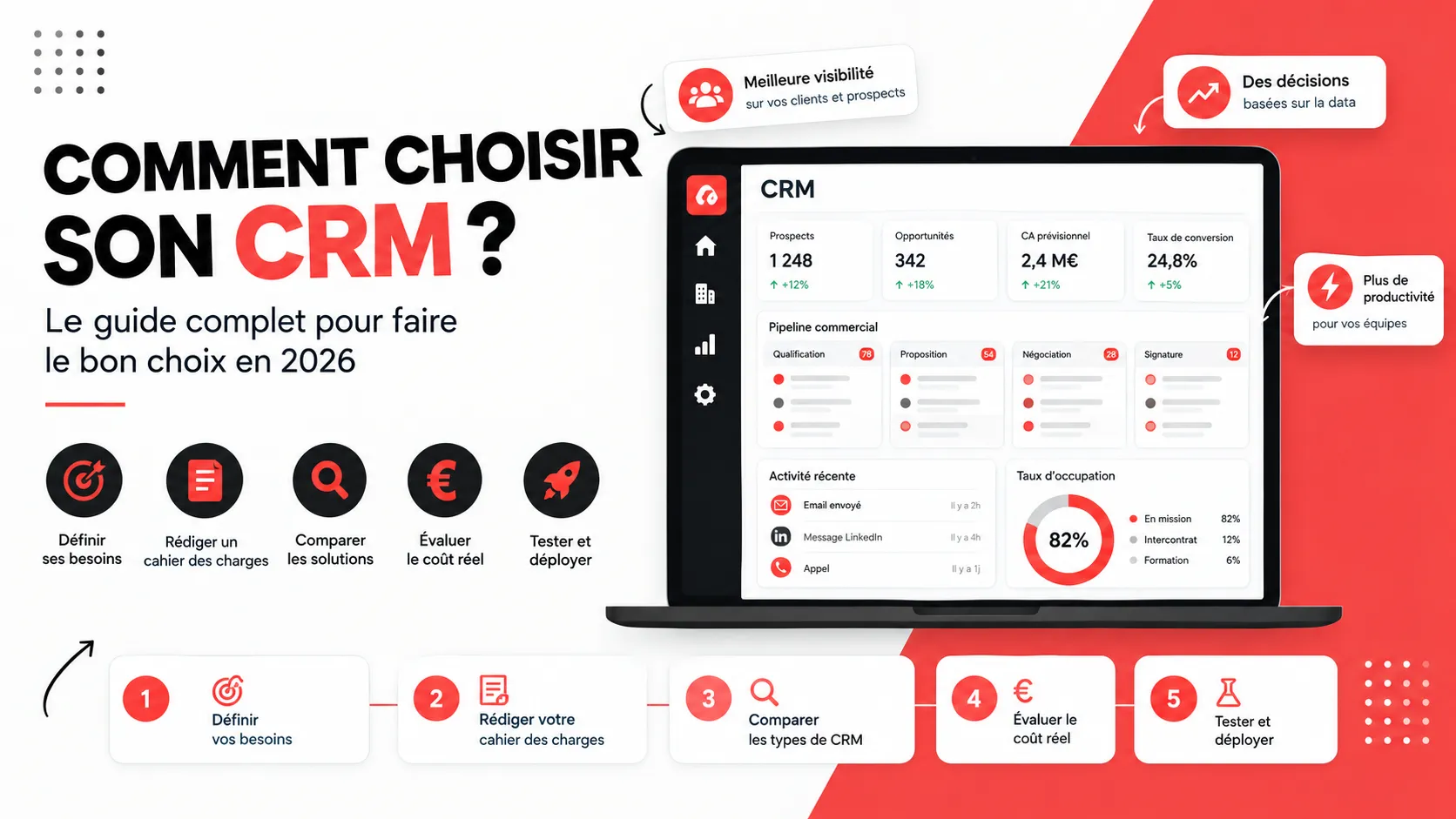
Choosing CRM software is one of the most structuring decisions for a company. A good CRM centralizes customer relationships, streamlines the work of sales and marketing teams, and provides a reliable dashboard for managing the business. A bad choice, on the other hand, results in users abandoning the tool, your company data scattered, and a wasted budget. So, how do you choose your CRM and make the right choice among hundreds of CRM solutions? This complete guide explains the method step by step: defining your needs, writing a specification document, comparing types of CRM, evaluating the real cost, testing software, and successfully deploying it.
What is a CRM and why choose your software carefully?
CRM stands for "Customer Relationship Management." It's a tool that gathers in a single database all information about your prospects and customers: contact details, exchange history, sales opportunities, quotes, invoices, customer service requests... It allows every employee to access the same information at the right time.
Why is it so important? First, because the tool becomes the foundation of your sales strategy: it drives prospect tracking, follow-ups, sales forecasts, and performance analysis. Second, because changing CRM is expensive: data migration, team training, workflow reconfiguration. Finally, because a poorly adapted CRM is rarely used: if the tool is too complex, sales teams go back to their Excel files and the CRM fails in its basic function – lightening the administrative burden.
A good CRM notably allows you to:
centralize customer data and eliminate duplicates;
automate repetitive tasks (follow-ups, emails, lead assignment);
track the sales pipeline and make forecasts more reliable;
improve customer experience through a history shared between teams;
measure results with clear dashboards.
Step 1: Define your needs before choosing
The first mistake is to start by comparing software. The right method is to start with your needs. Before choosing a solution, gather the teams concerned (sales, marketing, customer service, management, IT) and ask yourself the right questions.
What objectives do you want to achieve with your CRM?
Do you want to improve prospect tracking? Shorten the sales cycle? Build customer loyalty? Better measure the return on investment of your campaigns? Professionalize your customer service? A precise, measurable, and shared objective guides all the selection criteria that follow.
Who will use the CRM daily?
How many users today, and in three years? For which profiles? Nomadic salespeople, office-based, managers, support? The number of users directly influences the price, since most software is billed per user per month. It also conditions onboarding: a simple tool for a small team doesn't have the same requirements as a CRM deployed in a large company.
What processes must be covered?
Map your customer journey: lead generation, qualification, commercial proposal, signature, invoicing, support, renewal... Note where you lose time or information. That's where the CRM must bring value.
Step 2: Write a specification document
The specification document formalizes your needs. It doesn't need to be fifty pages long: for an SME, a one-to-three-page document suffices, provided it's prioritized. Distinguish what is essential, what is desirable, and what is a bonus.
An effective specification document includes:
the context, objectives, and scope of the project;
the expected features, classified by priority;
the number and profile of users;
the tools with which the CRM must interact (email, accounting, ERP, website, emailing tool);
security and compliance constraints (GDPR, data hosting, encryption);
the budget and deployment timeline;
the decision criteria and validation process.
This document will serve as your grid for comparing CRM solutions and as a basis for discussing with vendors during demonstrations.
What are the different types of CRM?
We classically distinguish three main types of CRM, to which are added hosting and economic model choices. Understanding these types of CRM prevents you from comparing tools that don't meet the same need.
Operational CRM
Operational CRM automates sales, marketing, and customer service processes. It manages contacts, opportunities, campaigns, and tickets. This is the most widespread type of CRM, suited to the majority of SMEs.
Analytical CRM
Analytical CRM leverages customer data to produce analyses: segmentation, scoring, forecasts, advanced dashboards. It is particularly useful for companies that have large data volumes and a team capable of interpreting them.
Collaborative CRM
Collaborative CRM facilitates information sharing between departments (sales, marketing, support, management) and sometimes with partners. It guarantees a single view of the customer and prevents each team from working with its own version of the facts.
SaaS CRM, cloud CRM, or on-premise CRM: which to choose?
A SaaS CRM (or cloud CRM) is hosted by the vendor and accessible from a browser: automatic updates, rapid deployment, monthly subscription. An on-premise CRM is installed on your own servers: it offers more control over data, but requires IT skills, maintenance, and a heavier initial investment. For most SMEs, the SaaS model is the simplest and most economical.
And open-source CRM?
An open-source CRM, like Dolibarr or SuiteCRM, offers accessible code and great customization freedom, often with zero license cost. In return, it requires time, technical skills, or a service provider for installation, security, and updates. It's an interesting option for organizations with very specific needs and a technical team.
What are the essential features of a good CRM?
How do you determine the features you need? Start from your specification document and check that the solution covers at minimum the following functions.
Contact and account management: complete customer record, interaction history, segmentation.
Sales pipeline: opportunity tracking, customizable stages, sales forecasts.
Automation: workflows, automatic follow-ups, lead assignment, notifications.
Marketing: campaigns, emailing, lead scoring, web forms, social media integration.
Customer service: tickets, SLAs, knowledge base, request tracking.
Quotes and invoicing: quote creation in the CRM, purchase orders, invoices.
Reporting and dashboard: key indicators, customizable reports, exports.
Mobility: mobile app for field teams.
Artificial intelligence: writing assistance, lead prioritization, recommendations. An intelligent CRM is a real bonus, but it should not come before the fundamentals.
Be careful not to fall into the trap of "the more features, the better." Management software that is too rich is often difficult to configure, and users only exploit a small part of its possibilities.
Criteria for choosing the best CRM for your company
Ease of onboarding
A CRM must be adopted by sales teams. If the interface is confusing, data entry tedious, or training long, the adoption rate drops. Favor a simple CRM with a clear interface, and test it with real users.
Ability to customize and evolve
Your company will evolve: new products, new teams, new markets. The CRM must be customizable (fields, modules, workflows) and remain scalable. Ask whether certain modules allow you to upgrade the software without rebuilding everything, and how updates are managed.
Integrations
With which tools must the CRM interact? Email, calendar, accounting, ERP, emailing tool, website, telephony: check for native connectors, an open API, or automation solutions. If you use a Data Warehouse, also check that the CRM can connect to it.
Security and GDPR compliance
A CRM stores personal data: compliance with the General Data Protection Regulation is essential. Check data hosting (ideally in Europe), encryption, access rights management, audit logs, and options for exporting or deleting data.
Support and guidance
A vendor that responds quickly, in your language, and offers training, documentation, and deployment support often makes the difference over time. Also look at customer reviews and the vendor's health.
How much does it cost?
Cost is not limited to the license price. To evaluate the real cost, take into account the entire project.
Licenses: in SaaS, expect €10 to €15 per user per month for entry-level offerings, €25 to €60 for mid-range offerings, and much more for advanced editions from major vendors.
Integration and configuration: internal time or service provider, sometimes higher than the license in the first year.
Data migration: cleaning, import, history recovery.
Training: initial and ongoing.
Options and add-on modules: marketing automation, electronic signature, storage, AI.
Maintenance and evolution: administration, updates, new integrations.
Depending on the number of users and the level of support, the annual budget can range from a few hundred euros with a free or entry-level CRM to several tens of thousands of euros for a more ambitious CRM project. Always compare the cost over three years, not just the displayed price. Not to mention installation and training time, which are real hidden costs for the company.
Overview of the main CRMs on the market
Salesforce remains the global reference on the market, closely followed by HubSpot, Microsoft Dynamics, and Zoho CRM. Here's an overview of what each CRM solution offers to help you identify the one that matches your company.
Salesforce: the reference for large companies
Salesforce is the most complete CRM on the market, highly scalable, with a considerable application ecosystem. It suits large companies and organizations with complex processes and dedicated administration teams. Its cost and complexity, however, are higher.
HubSpot: simplicity and marketing
HubSpot offers a very generous free CRM and modular paid offerings (Sales, Marketing, Service). Its interface is simple, its onboarding quick, making it a frequent choice for inbound-marketing-oriented SMEs. Prices, however, increase significantly with options.
Zoho CRM: the best features/price ratio
Zoho CRM appeals with its accessible pricing, customization, and ecosystem of more than forty applications. It suits SMEs well that want a rich tool without a large-company budget.
Sellsy, Pipedrive, and French solutions
Sellsy combines CRM, quotes, and invoicing, which appeals to agencies and very small businesses. Pipedrive is centered on the sales pipeline and very popular with sales teams. These tools remain simple to deploy and suited to small teams.
Centra: the CRM designed for outbound prospecting
Centra is a CRM that brings together in a single tool prospect research, multi-channel prospecting (email and LinkedIn), and pipeline management. Unlike a generalist CRM like Salesforce or HubSpot, it is designed for sales teams that do outbound, meaning they go out and find their prospects rather than waiting for inbound requests. Its objective: to replace the classic stack of CRM, emailing tool, LinkedIn automation tool, and enrichment software, as well as the back-and-forth on Excel.
What Centra offers The platform is organized around three pillars:
Find: prospect research via LinkedIn, French company registries, the Chrome extension, or importing your files, with enrichment of emails and phone numbers and an AI agent to help you in your research.
Engage: campaigns that combine emails and native LinkedIn actions (invitations, messages, InMail) within multi-step sequences.
Manage: contacts, companies, pipelines, tasks, and complete exchange history centralized in one place.
Everything rests on Memory, a context base that groups your company profile, your ICPs (ideal customer profiles), and the team's playbooks, so that prospecting remains consistent from one salesperson to another. On the integrations side, Centra relies on LinkedIn via its Chrome extension, offers connections with VoIP telephony systems, and allows you to import your existing data.
Centra's pricing
Centra offers three monthly plans and a 14-day free trial with full access to the product:
Solo (€69 per month): for founders and independents who prospect on LinkedIn. One user, one workspace, 50 credits, and 1,000 emails per month.
Team (€119 per month): for outbound teams. Unlimited users in one workspace, 200 credits, and 10,000 emails per month.
Agency (€219 per month): for agencies managing prospecting for multiple clients. Unlimited users and workspaces, unlimited emails.
In other words, the price is not calculated per user as with most vendors: from the Team plan onward, the whole team can log in, which changes the real cost calculation for a sales team of several people.
For whom, and with what limits?
Centra is aimed at outbound sales teams, notably those who prospect on LinkedIn: founders, agencies, recruitment firms, training organizations, IT services companies, and consulting firms. If your acquisition relies mainly on inbound requests, customer service, or integrated invoicing, a generalist CRM will remain more suited, because Centra focuses on prospecting and sales pipeline tracking. As with any CRM solution, take advantage of the free trial to test the tool with your sales teams before committing.
Which CRM to choose according to your company size?
Independent or very small business: a simple and free or low-cost CRM, with integrated quotes and invoicing.
SME: a modular, customizable SaaS CRM, with marketing automation and accounting integration.
Mid-sized company and large enterprise: a robust, highly scalable CRM system, capable of managing multiple teams, fine-grained access rights, and a connector to the ERP and information system.
How to test a CRM before making a decision?
Never sign on the sole basis of a sales demonstration. Here's a simple method for choosing the right CRM.
Shortlist a maximum of three CRM solutions based on your specification document.
Request a demonstration based on your real use cases, not on a generic scenario.
Open a trial period and have real users test the CRM, including the most skeptical.
Import a sample of your data to verify the quality of the migration.
Check critical integrations in real conditions.
Consult customer references in your sector and read reviews.
Compare the cost over three years and negotiate.
How long does it take to choose a CRM? Generally allow one to three months for an SME, from defining needs to the final decision.
In summary
To choose a suitable CRM, define your needs, write a CRM specification document, compare types of tools and market solutions (Salesforce, HubSpot, Zoho CRM, Centra, Sellsy, Pipedrive), test with your teams, and evaluate the real cost. The best CRM is not the most well-known; it's the one your sales teams will use every day and that will be able to evolve with your company.